
TL;DR
CIOs and CTOs should decide build vs buy AI one use case at a time. Buy when a Copilot or SaaS agent already fits the workflow. Build in-house only for true differentiators with a funded long-term team. Partner when value depends on company data but AI delivery depth is thin, typically reaching production in 8 to 14 weeks. Score each path on cost, speed, control and risk first.
For CIOs and CTOs weighing build vs buy AI for the next use case, the technology is rarely the open question anymore. The harder question is ownership. Should a vendor run it, should the internal engineering team build it, or should a partner build it inside the company’s own environment?
The choice is harder than it looks because every path hides a cost. Buying looks cheap until the tool cannot reach ERP data. Building looks like control until the best engineers spend their week maintaining evaluation pipelines instead of shipping. Partnering looks safe until the knowledge needed to run the system leaves with the consultants.
For a technology leader accountable to the board for AI returns, the wrong path can cost a full budget cycle. This post gives CIOs and CTOs a scoring framework for all three paths across cost, speed, control and risk, with realistic cost ranges and the Microsoft options on each path. It closes with 12 questions to put to any AI partner before signing. Addend Analytics builds AI and analytics on the Microsoft stack, so we have a point of view, and the post says plainly where partnering with us is the wrong call.
“A good AI partner should be working toward being unnecessary. If the code, prompts and know-how aren’t sitting with the client’s own team by the end of the engagement, it wasn’t a partnership. It was a dependency.”
Client testimonial
Addend treated evaluation and governance as deliverables, not extras. Our security team signed off faster than on any previous AI project, because the access controls and audit logs were there from day one.” [Name], [Title], [Company]
3 Enterprise AI Paths Explained
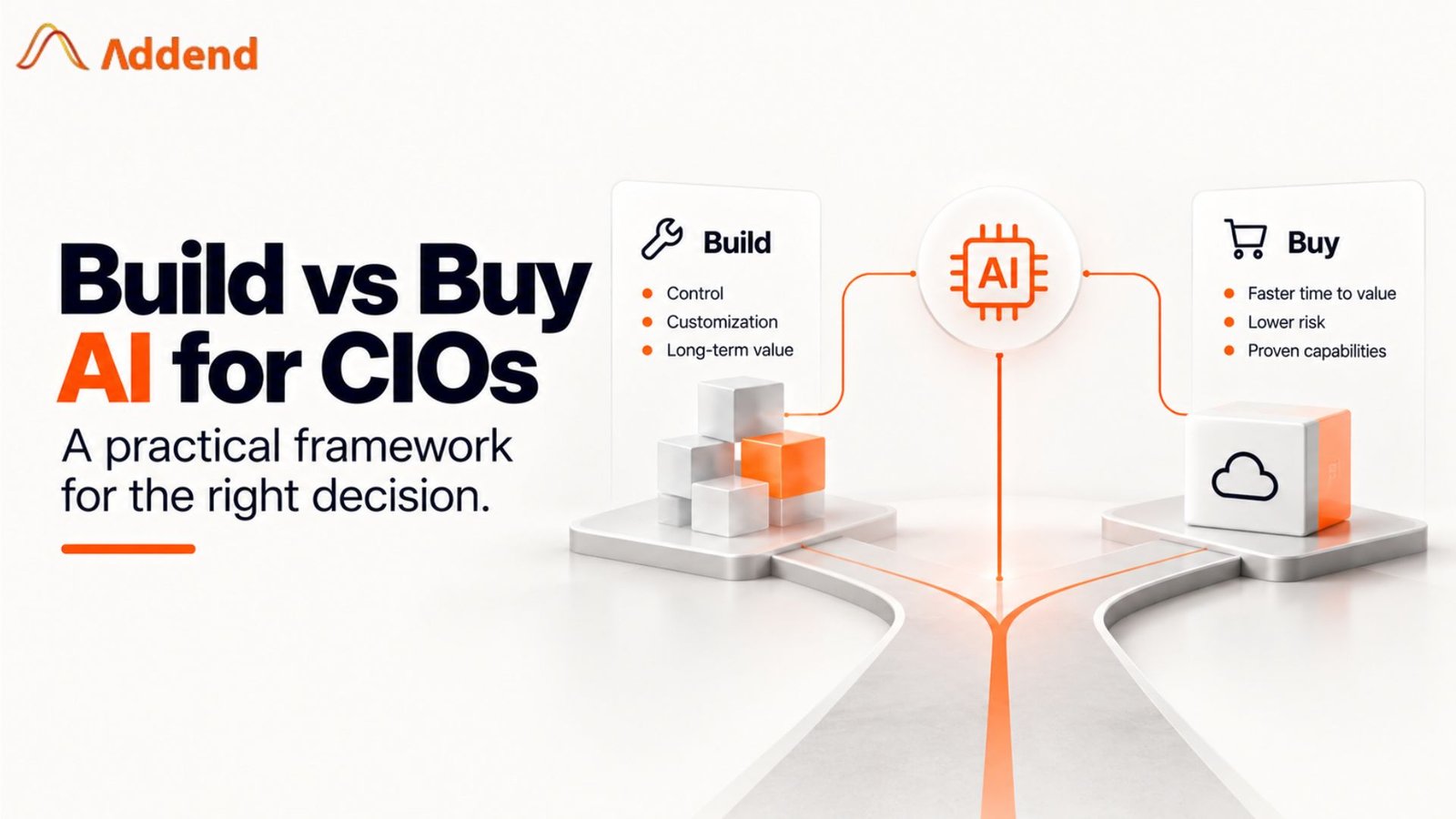
The first mistake is treating this as one enterprise decision. It is a decision per use case. Most CIOs we work with end up buying for some workloads, partnering for a few, and building one or two. The three paths mean specific things:
- Buy. You adopt a finished product and configure it. On the Microsoft stack, that is Microsoft 365 Copilot, a role-based Copilot, or a prebuilt agent. Your team manages licences, permissions and adoption, not code.
- Build. Your team designs, ships and runs the solution, usually on Microsoft Foundry (renamed from Azure AI Foundry in late 2025) or on custom infrastructure. You own the code, the evaluation sets, the monitoring and the on-call rota.
- Partner. An outside firm builds on your platform, in your tenant, then hands over or co-runs it. You keep the IP and the data. The partner brings delivery experience you would otherwise hire for over a year.
Microsoft frames the same choice as a decision tree in its Cloud Adoption Framework. The first branch is simple: if a SaaS agent meets your functional requirements, adopt it. Only when nothing fits do you choose between Copilot Studio (low-code, on a SaaS platform), Foundry (pro-code, platform as a service) or custom infrastructure. That ordering is a useful discipline, because it forces you to prove a gap before you fund a build.
Set expectations on commitment early. A bought tool can be piloted in weeks and dropped at renewal. A partner-led build is typically a 2 to 4 month commitment to first production, followed by a run decision. An in-house build is a multi-year commitment to a team, because AI systems need continuous evaluation and upkeep after launch.
The cost of standing still is rising too. Gartner expects a third of enterprise software applications to include agentic AI by 2028, up from under 1% in 2024. If you do not choose a path, your software vendors will choose one for you, with their roadmap and their pricing.
Enterprise AI Costs Compared: Licences, Pilots and Teams
Pricing depends on scope, but that is not an answer, so here are ranges. The heaviest generative AI approaches can run from $5 million to $20 million, according to Gartner, which also predicted that at least 30% of generative AI projects would be abandoned after proof of concept by the end of 2025. Most first enterprise use cases are far smaller than that. The ranges below reflect Addend’s delivery experience with mid-market and enterprise clients for a first production use case at US rates.
Buy: low entry cost, metered at scale
Microsoft 365 Copilot is a per-user licence. Agents built or extended in Copilot Studio are billed in Copilot Credits: $200 a month for a 25,000-credit pack, or $0.01 per credit on pay-as-you-go, per Microsoft. The hidden cost is readiness work: fixing oversharing in SharePoint, applying sensitivity labels and running a pilot. Budget $15,000 to $60,000 for that, depending on how clean your Microsoft 365 permissions are.
Partner: a fixed-scope pilot, then a run decision
A partner-led first use case on Foundry or Copilot Studio typically costs $60,000 to $200,000 over 8 to 14 weeks. Azure consumption for a single production workload usually lands between $2,000 and $15,000 a month, driven by volume and model choice. Ask for a fixed-price pilot with a named success metric and an exit point, so the worst case is a known number.
Build: the team is the cost
A minimum in-house team for production AI is an AI engineer, a data engineer, a platform engineer and a product owner. Fully loaded, that is $700,000 to $1.5 million a year in the US before any platform spend. First production usually takes 6 to 12 months, because the team is building its tooling while it builds the use case.
What pushes cost up, and what keeps it down
- Up: ungoverned or scattered data, many system integrations, regulated outputs that need human review and audit trails, and reasoning-heavy agents that consume more credits or tokens per task.
- Down: one workflow with one owner, data already landed in Microsoft Fabric or OneLake, a baseline metric agreed before kickoff, and reuse of Microsoft’s built-in content safety and identity controls.
Whichever path you take, budget for running the system, not just shipping it. Evaluation, monitoring, prompt and model updates and security reviews typically add 20% to 30% of the initial build cost every year. A build that is not funded to run becomes a buy decision made later, at a worse price.
How to Score Each AI Path in Four Criteria
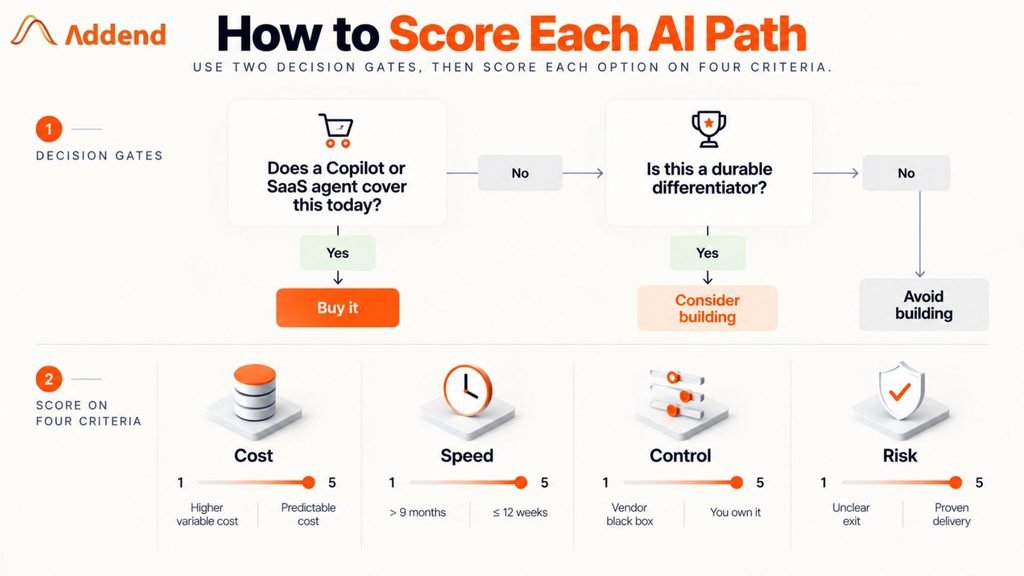
Before scoring, run two gate questions. They settle about half of use cases without a spreadsheet.
- Does a Copilot or SaaS agent cover the workflow today, without heavy workarounds? If yes, buy it and move on. Revisit at renewal.
- Is this capability a durable differentiator that a competitor could not simply buy? If yes, and you can fund a team to run it for three years, building in-house is a real option. If no, building is rarely worth it.
For everything that passes the gates, score each path from 1 to 5 on four criteria, then weight the criteria to fit the use case. Weights should add to 100. A customer-facing agent in a regulated process might weight risk at 35; an internal productivity tool might weight speed at 35.
| Criterion | What a 1 looks like | What a 5 looks like |
| Cost | Large upfront spend, open-ended run cost, no cap on consumption | Known pilot price, predictable monthly run cost with caps in place |
| Speed | First production use more than 9 months out | In production with real users inside 12 weeks |
| Control | Logic, prompts and data handling sit in a vendor black box | You own code, prompts, evaluation data and deployment in your tenant |
| Risk | Unproven team or tool, no evaluation plan, unclear exit | Proven delivery, release gated on quality thresholds, clean exit terms |
Scoring rubric: score each path from 1 to 5 on every criterion before weighting.
Here is how the three paths usually compare before you apply your own weights. Treat it as a starting point for the scoring conversation, not the answer.
| Criteria | Buy (Copilot or SaaS agent) | Partner (build with a firm) | Build (in-house team) |
| Upfront cost | Lowest: licences plus $15K to $60K readiness | Medium: $60K to $200K fixed-scope pilot | Highest: $700K to $1.5M a year in team cost |
| Time to first production | 2 to 6 weeks | 8 to 14 weeks | 6 to 12 months |
| Control over logic and data | Low: configure within vendor limits | High, if code and deployment stay in your tenant | Full |
| Delivery risk | Low build risk, high fit risk | Medium: depends on partner track record | High for a first build |
| Knowledge retention | Sits with the vendor | Depends on the handover plan | Stays in house |
| Best for | Commodity productivity and standard workflows | Data-dependent workflows where you lack AI delivery depth | Core differentiators with a funded, long-term team |
Approach comparison for a first production use case; ranges are Addend estimates at US rates.
Benefits of a Partner-Led Approach to Enterprise AI
When your scores point to partnering, it helps to be clear about what you are actually buying. You are not buying a vendor’s product or renting headcount. You are buying a shorter path to a production system that you own. Six benefits matter most to CIOs and CTOs at the decision stage.
1. Faster Time to Production
A partner arrives with delivery patterns, reference architectures and evaluation tooling that an in-house team would have to build first. That is the main reason a partner-led pilot can reach a production candidate in 8 to 14 weeks rather than 6 to 12 months. Every month saved is a month of value your business sees sooner.
2. Higher Odds of Reaching Deployment
The MIT NANDA research cited earlier found that vendor purchases and partnerships reached deployment about twice as often as internal builds. A partner has already met the failure points that stall first projects, such as messy source data, unclear success metrics and missing release gates. You pay for that experience once, rather than learning it on your own budget.
3. Ownership Without a Large Upfront Hire
A good partner builds in your tenant and hands over the code, prompts and evaluation data. You get the control of a build without first recruiting a four-person AI team at $700,000 or more a year. If the use case proves its value, you can hire to run it with a working system already in place.
4. A Predictable, Capped Budget
A fixed-scope pilot with a named exit point turns an open-ended research project into a known cost. Your CFO sees a clear number, a success metric and a decision date. That makes AI spend far easier to approve than an in-house program with no defined end.
5. Governance and Security from the Start
Experienced partners set up access controls, sensitivity labels, content safety and audit logging as part of the first release. These controls are expensive to retrofit after go-live, and missing them is one of the risk factors Gartner links to cancelled AI projects. Building them in early protects both the project and your audit position.
6. Capability that Stays with Your Team
A structured handover leaves your engineers able to run, extend and repeat the work. The second use case then costs less and moves faster, because your team already knows the platform, the patterns and the release process. Over time, the partner becomes optional rather than permanent.
| Benefit | What it means for a CIO or CTO | How to check it in the contract |
| Speed | Production candidate in weeks, not quarters | Dated milestones in the statement of work |
| Deployment odds | Fewer pilots that stall after proof of concept | Production references you can call |
| Ownership | Code, prompts and data stay with you | IP and tenant clauses |
| Budget control | Known pilot cost and exit point | Fixed price with a go or no-go gate |
| Governance | Audit-ready from the first release | Named controls in the acceptance criteria |
| Team capability | Lower cost for every later use case | Knowledge-transfer plan by role and date |
Partner-led benefits and how to make each one contractual.
7 Criteria for Choosing an AI Consulting Partner
If your scores point to partnering, the next risk is choosing the wrong partner. Rank these criteria in order. The first three are the ones most often skipped in AI vendor selection.
- Production references, not demos. Ask to see systems that real users rely on today, and ask who runs them. A polished proof of concept tells you little about month six.
- Your tenant, your repositories. Everything should deploy into your Azure subscription and your source control. The contract should give you the code, prompts and evaluation data.
- Data engineering depth. Most AI failures are data failures. A partner who cannot model your ERP and operational data will build on sand.
- Evaluation as a deliverable. Quality thresholds, test sets and a release gate should be in the statement of work, not promised verbally.
- Governance built in. Expect Entra ID permissions, Purview labels and responsible AI checks from day one, because they cannot be retrofitted cheaply.
- A dated knowledge-transfer plan. Named roles on your side, sessions on the calendar, and runbooks your team can use without the partner.
- Commercial honesty. A fixed-scope pilot, a clear exit point, and a partner willing to tell you when to buy instead.
If you are comparing firms now, our roundup of AI consulting firms is a useful long list to score against these criteria.
Common CIO Concerns About Partnering on AI
These are the four objections we hear most in the final round of a decision. Each deserves a straight answer.
Notice that cost, value and risk are the same failure points the scoring framework tests. Scoring up front is the cheapest way to avoid becoming part of that statistic.
When Addend is not the right fit
- If your need is Microsoft 365 productivity only, buy Copilot and work with your licensing partner. You do not need a build partner.
- If your data is still in spreadsheets and disconnected systems, start with the data foundation. Our analytics roadmap work is the better first step, and AI comes after.
- If AI is your product, build the team in house. A partner can accelerate, but the capability has to live with you.
12 Questions to Ask an AI Consulting Partner Before Signing
Copy these into your next vendor meeting. Strong partners answer them specifically and in writing.
- Can you show two AI use cases you took to production, and who runs them today?
- Will everything deploy into our Azure tenant, with code in our repositories?
- Who owns the IP, prompts and evaluation datasets when the engagement ends?
- How will you measure quality before go-live, and what threshold blocks a release?
- What does monitoring look like after launch, and who responds to an incident?
- How do you handle a model version change or deprecation?
- Which data sources do you need, and what data work do you expect from our team?
- How do you enforce our access controls so the AI only sees what each user can see?
- What is the fixed price and scope of the pilot, and where is the exit point?
- What will monthly run cost be at our volume, and how is it capped?
- What does knowledge transfer include, by role and by date?
- When would you advise us to buy a product instead of building with you?
Your next 30 days
- Week 1: list and gate. Collect candidate use cases and run the two gate questions. Buy where a product already fits.
- Week 2: score. Weight cost, speed, control and risk for your top three remaining use cases and score all three paths with your finance lead in the room.
- Weeks 3 and 4: test partners. Take the 12 questions to two or three firms and choose a fixed-scope pilot with a named metric and exit point.
How Addend Analytics Delivers Enterprise AI on Microsoft
If your scores point to partnering and your business already runs on Microsoft, Addend Analytics is built for exactly that situation. We are a Microsoft-focused data and analytics consultancy, so AI is not a separate practice bolted onto our work. It sits on top of the Power BI, Microsoft Fabric and data engineering foundations we already deliver for mid-market and enterprise clients.
Here is how we line up against the seven partner criteria in this post:
- Data first, then AI. Most AI projects fail on data, and data engineering is our core work. We land and model your ERP, MES and finance data in Fabric before an agent ever reads it, so answers are grounded in numbers your teams already trust.
- Built in your tenant, owned by you. Everything we build runs in your Azure subscription and your repositories, on Microsoft Foundry or Copilot Studio. Code, prompts and evaluation sets are yours from day one, with no proprietary platform in the middle.
- Honest about the right path. We run the same build, buy or partner scoring with you before scoping any work. If a Copilot licence solves the problem, we will tell you to buy it.
- Fixed-scope pilots with a clear exit. Every engagement starts with a defined pilot, a named success metric and a go or no-go decision date. You know the worst-case cost before you sign.
- Evaluation and governance in the statement of work. Quality thresholds, release gates, Entra ID permissions and Purview labels are deliverables, not promises.
- Cost-efficient delivery. Our onshore and offshore delivery model keeps senior architects on your account while lowering the overall cost of the build, which matters when a pilot has to prove ROI quickly.
- Handover your team can use. Runbooks, recorded sessions and paired build time leave your engineers ready to run and extend the system without us.
FAQs
Author By

Rajeshwari Sharma
Rajeshwari is an experienced data professional with a track record of using data-driven insights to improve business performance. She has successfully managed multiple projects, utilising her expertise in data analysis and database administration. As a Microsoft-certified Data Analyst and Azure Database Administrator, she has cultivated a deep understanding of data management best practices and advanced analytics techniques. Her MBA in Business Analytics has equipped her with a solid foundation for integrating business strategy with data insights.