
TL;DR
Microsoft Fabric and Azure Synapse Analytics are both Microsoft data platforms, but they are not interchangeable. Synapse is a PaaS service you manage piece by piece, dedicated SQL pools, Spark pools, and pipelines. Fabric is a unified SaaS platform built on OneLake, where Spark, SQL, and Power BI all share the same data without copying it. Most teams end up running both, migrating workloads one at a time.
Your team just spent three sprints wiring together a Synapse dedicated SQL pool, a Spark pool, and three pipelines. Power BI still will not refresh without breaking.
That is the real cost of putting off the Microsoft Fabric vs Azure Synapse decision. Microsoft has not retired Synapse, but new features like Direct Lake and OneLake are shipping to Fabric first, so IT leaders are stuck choosing between migrating now, waiting, or running both.
This post breaks down what actually changed, when each platform fits, and what a realistic migration looks like, so you can decide based on your own environment, not a roadmap slide.
Teams get hurt when they treat this as an all or nothing switch. The workloads that move cleanly to Fabric should move now. Everything else can stay on Synapse until the gap closes, and that is a legitimate strategy, not a stall tactic.
Fabric vs Synapse: Where the Platforms Actually Diverge
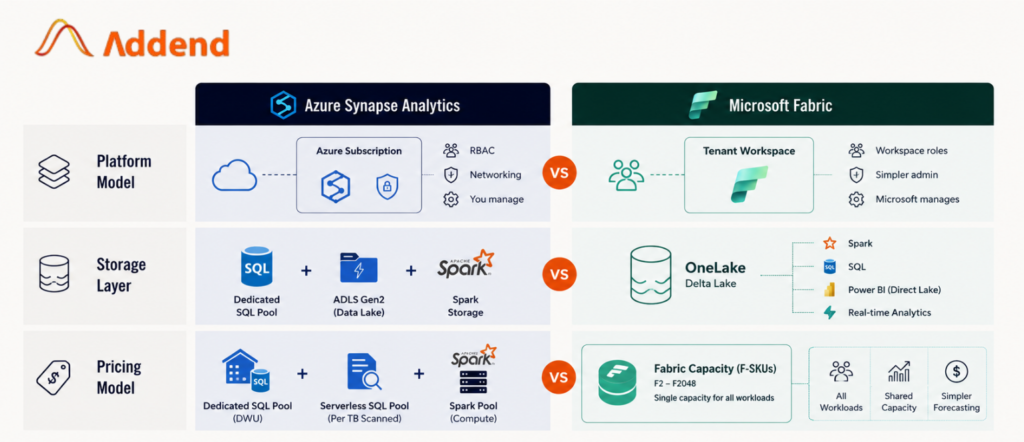
The starting point for any Microsoft Fabric vs Azure Synapse comparison is not features, it is deployment model. Azure Synapse Analytics is a PaaS offering. You provision dedicated SQL pools, configure Spark pools, set up networking, and manage scaling yourself inside an Azure subscription. Microsoft Fabric is a SaaS product. Microsoft runs the infrastructure, and your team works inside a tenant-level workspace instead of a resource group.
That distinction sounds administrative, but it changes daily work. Synapse teams spend real time on capacity planning, VNet configuration, and pool scaling. Fabric teams spend that time on data modeling and pipeline logic instead, because the underlying compute is managed for them.
Platform Model
Synapse workspaces sit inside your Azure subscription with standard Azure role-based access control and networking. Fabric workspaces use tenant-based, workspace-level roles that are simpler to administer but offer less granular network isolation today. If your compliance team requires private endpoints and managed VNets at the service level, verify current Fabric support before committing, since this area is still maturing.
Storage Layer
This is the biggest architectural change. Synapse stores data across separate systems, dedicated SQL pool storage, ADLS Gen2 for the lake, and Spark’s own working files. Fabric replaces all of that with OneLake, a single Delta Lake based storage layer that every workload, Spark, SQL, Power BI, and real-time analytics, reads from and writes to directly. Data written by a pipeline becomes available to Spark and to Power BI’s Direct Lake mode without copying it anywhere.
Pricing Model
Synapse pricing is component based. You pay for Data Warehouse Units on the dedicated SQL pool, per terabyte scanned on the serverless SQL pool, and separately for Spark pool compute. Fabric uses a single capacity unit model, priced in F-SKUs from F2 up through F2048, that covers every workload sharing that capacity. This makes Fabric easier to forecast but means a single busy workload can consume capacity that other teams also depend on, so capacity planning still matters, it just moves to a different layer.
Inside Fabric’s Unified Workload Model
Beyond the architecture diagrams, four concrete changes matter most for teams evaluating whether to move.
OneLake Removes Data Duplication
In Synapse, moving data between the dedicated SQL pool and Spark often meant physically copying it, or building views and external tables to bridge the two. OneLake uses shortcuts, pointers to data in place, so a Fabric Lakehouse can reference existing ADLS Gen2 data, including data still sitting in a Synapse workspace, without duplicating it. That single change removes a category of pipeline work that used to exist purely to sync storage layers.
Unified Workloads Replace Separate Pools
Synapse treats data engineering, data warehousing, and real-time analytics as separate pools you provision and manage independently. Fabric treats them as workload types inside one workspace, Lakehouse, Warehouse, Data Factory pipelines, and Eventstream for real time, all sharing OneLake and the same governance model. Real-time analytics is a good example. Synapse requires stitching together Event Hubs, Stream Analytics, and custom Spark streaming jobs. Fabric’s Eventstream and Eventhouse handle that natively, using KQL, inside the same platform.
Power BI Integration Is Native, Not Bolted On
Synapse and Power BI are separate Azure services that you connect. Fabric and Power BI share the same workspace and the same OneLake data. Direct Lake mode lets Power BI query Delta tables in OneLake directly, without importing data or maintaining a separate semantic model refresh schedule, which is the specific problem in the sprint scenario at the start of this post.
Microsoft Fabric has more than 28,000 organizations as paying customers, with 60% year-over-year growth.(Microsoft Fabric blog, 2025)
That adoption curve is also why Synapse feels less like a dead end and more like a platform in a long, deliberate handoff. Microsoft’s own migration guidance frames it as a phased move, not a forced cutover.
Signs You’re Ready to Move to Microsoft Fabric
Fabric tends to be the stronger choice in a specific set of situations, and the pattern across most implementations is consistent.
- You are starting a new analytics project with no existing Synapse investment to protect.
- Your Power BI team spends real time fighting semantic model refreshes and duplicate datasets.
- You need real-time analytics and do not want to assemble Event Hubs, Stream Analytics, and Spark streaming by hand.
- Your organization is building AI features on top of your data estate and wants Copilot, Fabric Data Agents, and OneLake Catalog available natively.
- You want one capacity model instead of separately metered SQL pools, Spark pools, and storage accounts.
Enterprises that consolidated their data estate on Microsoft Fabric achieved a 379% return on investment over three years.(Forrester Total Economic Impact study, cited 2025)
Where Synapse Still Outperforms Fabric
Fabric is where new investment is going, but that does not make every current Synapse workload a candidate for immediate migration. Several situations still favor staying put.
- Your dedicated SQL pool is stable, tuned, and meeting performance requirements, and migration cost would outweigh the near-term benefit.
- Your Spark workloads use .NET for Spark, which has no rewrite path to Fabric planned yet.
- You depend on an external Hive metastore, GPU-accelerated Spark pools, or VNet-bound workloads, none of which Fabric supports natively today.
- Your industry requires network-level isolation, managed VNets and private endpoints at the service layer, that Fabric’s current networking model does not yet match.
- You run Synapse Link for Dataverse or Cosmos DB in production and it is working reliably.
Through 2026, Gartner estimates that 80% of organizations will fail to scale AI projects because of inadequate data foundations, which is a reminder that the platform choice matters less than whether your data foundation is trustworthy in the first place, on either platform.
Gartner, cited via DataArt research review, 2025
Fabric and Synapse, Feature by Feature
| Capability | Microsoft Fabric | Azure Synapse Analytics | Why It Matters |
| Platform model | SaaS, managed by Microsoft | PaaS, you manage deployment | Fabric lowers ops overhead, Synapse gives more control |
| Storage layer | OneLake, unified Delta format | Dedicated pool storage plus ADLS Gen2 | OneLake removes duplicate copies across workloads |
| SQL analytics | Warehouse with SQL endpoint | Dedicated and serverless SQL pools | Synapse still wins on deep, manual tuning |
| Real-time analytics | Native Eventstream and Eventhouse | Requires Event Hubs plus Stream Analytics | Fabric needs fewer moving parts to stand up |
| Power BI integration | Native, Direct Lake in-workspace | External connection, separate refresh | Fabric removes a common refresh failure point |
| Pricing model | Capacity units, F2 to F2048 | Component based, DWU plus per-TB | Fabric capacity is easier to forecast |
| AI and Copilot | Native across notebooks and Power BI | No native Copilot integration | Relevant if AI features are on your roadmap |
Capabilities reflect Microsoft’s current published documentation as of 2026 and are subject to change as both platforms evolve.
What a Synapse to Fabric Migration Actually Involves
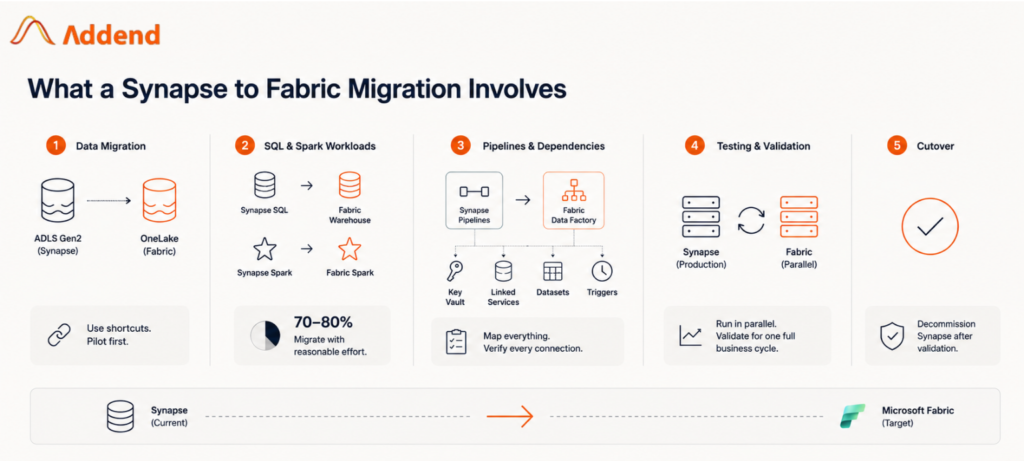
If you decide to move, the honest starting point is that there is no automatic, one click migration path from Synapse to Fabric. Microsoft provides tooling and guidance, but manual effort is required to adapt most workloads, and the effort varies a lot by workload type.
Data Migration
OneLake shortcuts are the fastest win here. They let a Fabric Lakehouse reference existing ADLS Gen2 data, including data tied to a Synapse workspace, without physically moving it. That means you can pilot Fabric workloads against real data before committing to a full data migration, which is worth doing before any larger cutover.
SQL and Spark Workloads
Spark workloads generally migrate the most cleanly, since Fabric’s Spark engine is built on the same open-source foundation. Heavily tuned dedicated SQL pools with complex distribution strategies are the hardest to move, because Fabric’s Warehouse does not expose the same distribution controls. Industry estimates suggest roughly 70 to 80% of Synapse artifacts and workloads migrate to Fabric with reasonable effort, which leaves a meaningful minority that need a rewrite or a decision to stay on Synapse.
Pipelines and Dependencies
Synapse Pipelines map fairly directly to Fabric Data Factory pipelines, but every custom activity, linked service, and Key Vault reference needs to be checked individually. Map dependencies before you migrate anything, not during. A pipeline that looks self-contained often has a downstream Power BI dataset, an external Hive metastore reference, or a scheduled trigger tied to a system outside Synapse that is easy to miss.
Testing and Validation
Run the migrated workload in parallel with the original for at least one full business cycle before decommissioning anything. This matters most for financial and compliance reporting, where a silent data discrepancy is far more expensive than a slower migration timeline.
Fabric or Synapse: A Framework for Decision making
Strip away the vendor messaging and the decision usually comes down to three patterns.
Choose Fabric if: you are starting new, your team is fighting Power BI refresh issues, or real-time and AI features are on your near-term roadmap.
Stay on Synapse if: your dedicated SQL pool is stable and tuned, you rely on .NET for Spark or an external Hive metastore, or you need network-level isolation Fabric does not yet match.
Run both if: you are in transition. Start new workloads in Fabric, keep stable Synapse workloads running, and build a phased migration roadmap based on which artifacts move cleanly.
Most organizations land in the third pattern for a period of months to years, and that is expected. Addend’s Strategy & Roadmap service is built for exactly this kind of sequencing decision, prioritizing which workloads move first based on business impact, not platform hype.
What to Do With This Comparison Next
If you take one thing from this comparison, it should be that Microsoft Fabric vs Azure Synapse Analytics is not a single decision you make once for your whole environment. It is a series of smaller decisions, one per workload, based on what each one needs today and what your roadmap actually requires next year.
If you are further along and want a second opinion on your data foundation before you decide, Addend’s data governance framework for Microsoft Fabric walks through the governance questions worth answering before any migration, on either platform.
If you are in this situation, the next step most teams find useful is a workload-by-workload assessment rather than a platform-wide migration plan. That keeps the risk contained and gives you real data on migration cost before you commit further.
How Addend Helps With Fabric and Synapse Decisions
Addend Analytics works across both platforms, not just Fabric, which matters because the honest answer for most environments is a mix of the two for a while. As a Microsoft-certified partner with hands-on experience in Power BI, Microsoft Fabric, and Azure Synapse, Addend’s role in a decision like this is less about pushing a migration and more about telling you which workloads are worth moving first and which ones are fine where they are.
In practice, that looks like a short workload assessment, mapping what you run today across Synapse and Fabric, flagging what depends on features Fabric does not support yet, and sequencing the rest into a roadmap your team can actually execute. It is the same kind of assessment referenced earlier in this post, applied to your own environment instead of a general framework.
Frequently Asked Questions
Answers to what people commonly search alongside Microsoft Fabric vs Azure Synapse Analytics.
Key Takeaways
- Azure Synapse is a PaaS platform you provision and manage yourself, while Microsoft Fabric is a SaaS platform built around a single shared storage layer, OneLake.
- OneLake removes the need to duplicate data across Spark, SQL, and Power BI, which was one of the most common sources of pipeline work in Synapse.
- Fabric tends to fit new analytics projects, real-time reporting, and teams tired of rebuilding Power BI datasets after every schema change.
- Synapse still makes sense for stable dedicated SQL pool workloads, .NET for Spark, and environments that need deeper network-level control.
- There is no automatic migration path, so mapping data, SQL, Spark, and pipeline dependencies before moving anything matters more than the migration itself.
- Most organizations run both platforms for a period, migrating workloads one at a time based on a clear decision framework rather than switching everything at once.
Author By

Kamal Sharma
Kamal brings over 20 years of experience in data analytics and business intelligence. He has led the design and implementation of analytics solutions across operations, financial reporting, and performance improvement initiatives. With a background in business statistics and Six Sigma, his work focuses on applying data in a structured and practical way to solve real business challenges.