
Track tasks, deadlines & team performance with real-time Power BI dashboards

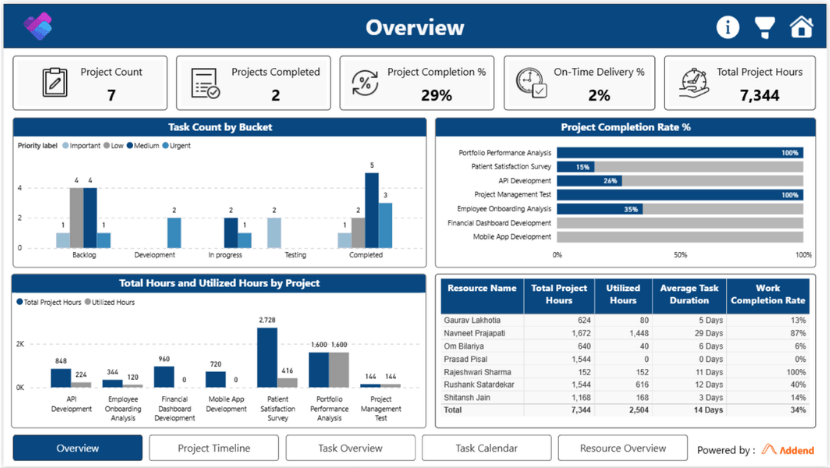
Microsoft Planner Task Management Report transforms Planner data into real-time insights that help organizations track tasks, monitor project progress, and improve team performance.

Common Task Management Challenges Teams Face

Limited visibility into tasks across teams

Difficulty tracking deadlines and project progress

Inefficient resource management and workload distribution

Lack of centralized reporting and actionable insights

What Microsoft Planner: Task Management Report Delivers

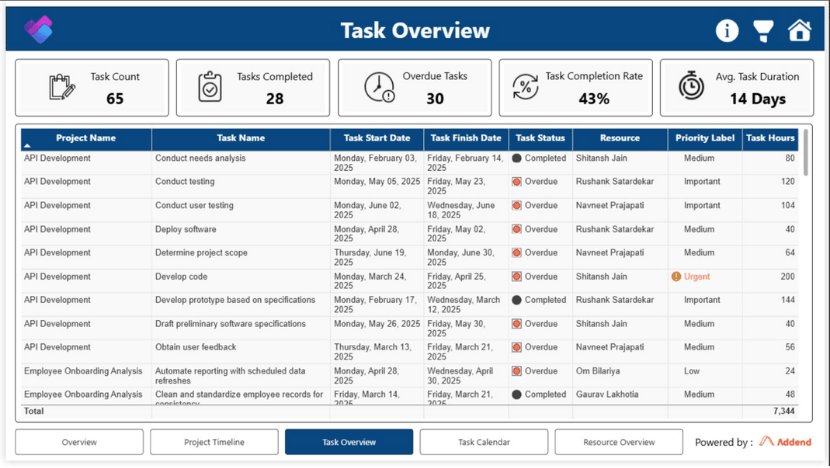
Task Overview Dashboard

Monitor task status, priorities, and assignments

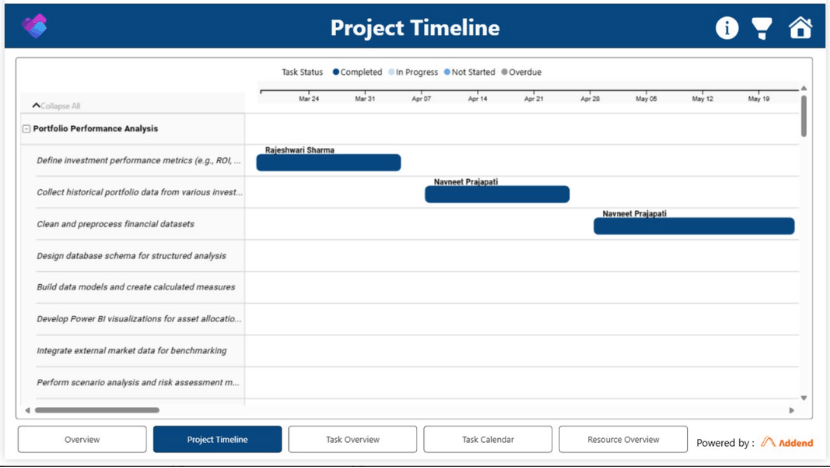
Project Timeline

Track deadlines and project progress visually

Task Calendar

View tasks by due date

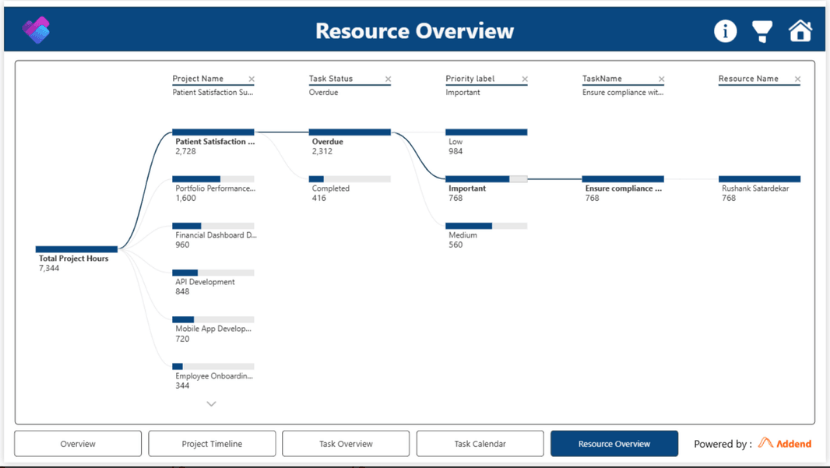
Resource Overview

Analyse team workload

Performance Insights

Identify delays and bottlenecks

How Real-Time Task Insights Improve Team Productivity

(The figures provided are subject to change and may vary periodically based on updated information)

30%

Up to improvement in task tracking and visibility

40%

Up to reduction in missed deadlines and delays

25%

Up to increase in team productivity and efficiency

Faster decision-making with real-time insights

Why Traditional Task Tracking Tools Fall Short

Traditional Methods vs Modern Analytics-Driven Approach

Excel / Manual Tracking

Time-consuming reporting

Microsoft Planner Task Management Report

From Task Tracking to Smart Decision-Making

Built for Modern Microsoft 365 Teams

Integration with Microsoft 365

Secure & scalable

Role-based access for better data control

Enhanced Task & Project Visibility

Faster, Data-Driven Decision-Making

Improved Team Performance & Productivity

Simple Setup

  • Enter Your Details Fill out the form and get started.
  • Connect Your Microsoft Planner Data Securely integrate Microsoft Planner with Power BI for centralized reporting and real-time visibility.
  • Configure Dashboards for Your Teams Customize dashboards based on projects, departments, priorities, and task workflows.
  • Enable Real-Time Reporting Automatically sync task updates, deadlines, and progress without manual reporting.
  • Start Tracking Performance Monitor workloads, project timelines, overdue tasks, and team productivity from one dashboard.

What You’ll See Next

  • Unified Task Visibility 
    Get a centralized view of tasks, projects, deadlines, and team activities. 
  • Live Project Tracking 
    Monitor real-time progress across teams without relying on manual updates. 
  • Smarter Resource Management 
    Understand workload distribution and improve team efficiency. 
  • Actionable Performance Insights
    Identify delays, bottlenecks, and productivity trends before they impact delivery. 
  • Faster, Data-Driven Decisions
    Enable managers and leaders to make quicker operational decisions with real-time dashboards. 

Learn more about the Microsoft Planner Task Management Report

Frequently Asked Questions

How is this different from traditional task management software?
Unlike traditional task management software, this solution provides advanced analytics and real-time dashboards using Microsoft Planner and Power BI, enabling better visibility, performance tracking, and data-driven decision-making.
Can this solution support project tracking across multiple teams?

Yes, it acts as a centralized project tracking software by consolidating data from multiple teams, allowing leaders to monitor progress, deadlines, and workload distribution in one place.

Is this suitable for organizations with complex project structures?

Yes, the solution is designed to handle complex projects by providing structured dashboards, timeline tracking, and detailed performance insights across multiple teams and departments.

How does this help improve team productivity and performance?
By offering real-time insights into tasks, deadlines, and resource allocation, it helps managers identify bottlenecks, optimize workflows, and improve overall team efficiency.
What insights can I gain from Microsoft Planner Task Management Dashboard?
You can gain insights into task status, deadlines, team workload, project progress, and performance trends, helping you identify bottlenecks and improve productivity.
Do I need a Power BI license to use this solution?
Yes, a Power BI Pro or appropriate license is typically required to access and share dashboards within your organization.
Is this solution suitable for large teams and enterprises?
Yes, the solution is scalable and designed to support teams of all sizes, offering centralized reporting and advanced analytics for enterprise-level task management.
Is my data secure in this solution?
Yes, the solution follows Microsoft’s security standards, ensuring data protection, role-based access, and secure integration within the Microsoft ecosystem.