
Microsoft Fabric Consulting Services in the USA
We help mid-sized companies across the United States bring scattered data into one trusted Microsoft Fabric platform, with Power BI reporting on top
- Microsoft Solutions Partner · Data & AI
- ISO 9001:2015 certified
- 8+years delivering Microsoft analytics
Get your free Fabric readiness check
500+
Data & analytics projects delivered
20%
Lower platform cost
70%
Faster time to insight
4.9/5
Average rating on Microsoft Marketplace
What you get from our Microsoft Fabric consulting services
As your Microsoft Fabric implementation partner, we build every engagement around business results, not just technology.
- One trusted source for company data in OneLake
- Data pipelines that refresh automatically
- Predictable Fabric capacity costs
- A team trained to run Microsoft Fabric
- Clear data governance and ownership
- Role-based security for the right people
- Power BI dashboards leaders rely on
- An AI-ready foundation for Copilot
Microsoft Fabric for US businesses
Addend Analytics works with mid-sized US companies that have outgrown spreadsheets and disconnected reports. We focus on the industries we know best, from manufacturing and consumer brands to professional services, law firms, real estate and nonprofits.
US office
12600 Deerfield Parkway, Suite 100, Alpharetta, Georgia 30004
+1 (470) 686-6644
Manufacturing
US manufacturers connect ERP, production, quality and supplier data so every plant reports from the same numbers.
Consumer packaged goods
Food, beverage and consumer brands combine retail, distributor and inventory data to track demand and margins by channel.
Professional services
Consulting, engineering and accounting firms see utilization, margins and cash flow by client in one place.
Law firms
Firms connect practice management and accounting data to track realization, collections and matter profitability.
Real estate
Owners and developers track occupancy, leasing and project budgets across multi-state portfolios.
Nonprofits
Nonprofits bring program, donor and grant data together for clear reporting to boards and funders.
How we keep your Microsoft Fabric costs down?
Microsoft Fabric is priced by capacity, not per tool. Reservations save around 41%, and OneLake storage is billed separately. We make sure you only pay for what you need.
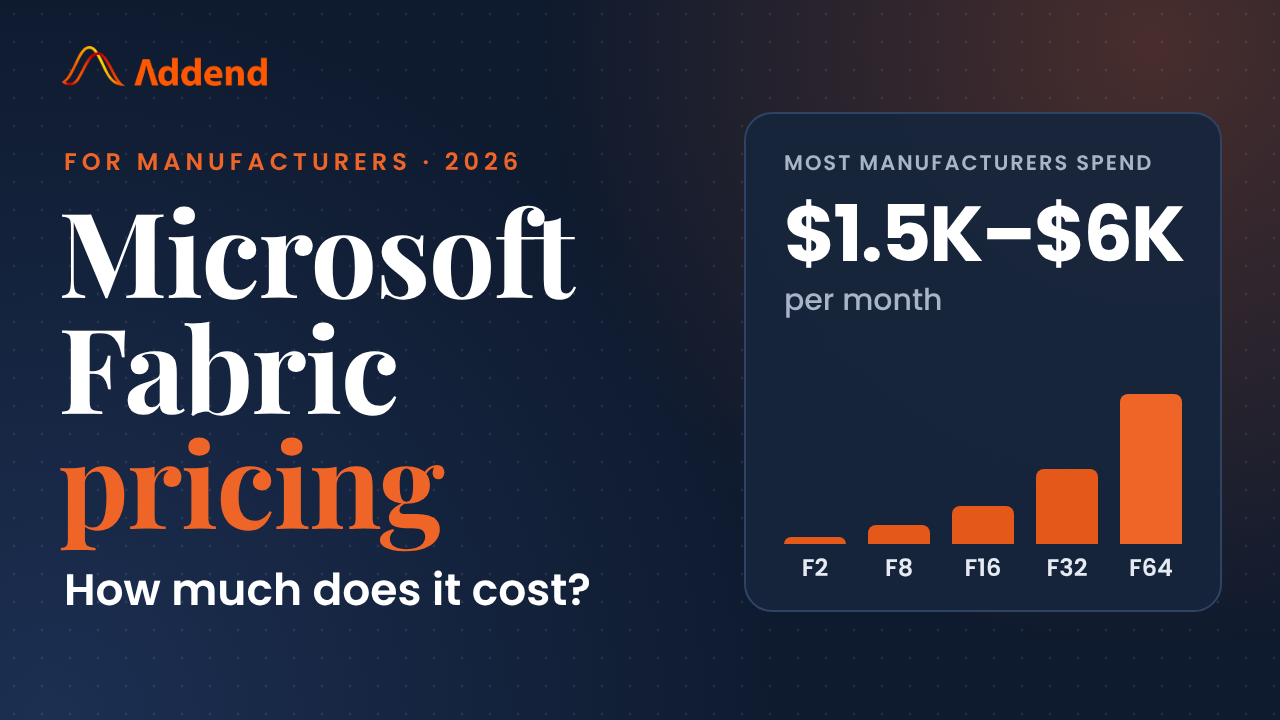
How we keep your microsoft fabric costs down
Pay for capacity, not per tool
We recommend the right capacity size in the readiness assessment.
The right license for each person
We map who needs which licence, so you don't overbuy.
Try Fabric before you commit
We run your proof of concept on the trial, so the decision is based on results.
Fewer tools, one copy of data
We build the business case and show what Fabric would cost to run before you sign up.
How Microsoft Fabric works
Microsoft Fabric is Microsoft's all-in-one analytics platform. Data integration, engineering, warehousing, data science, real-time analytics and Power BI all work on one shared copy of your data in OneLake, under one bill. Our services below cover each part.
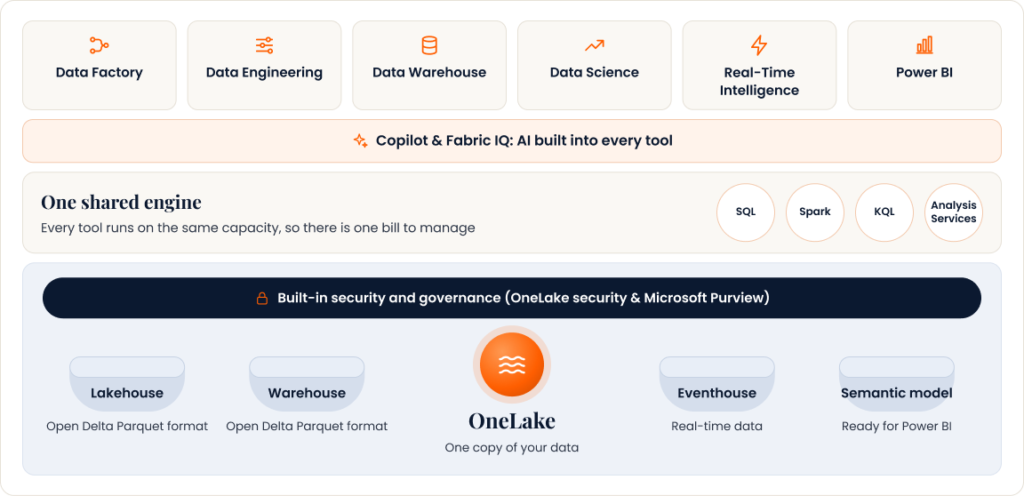
Every Fabric workload (Data Factory, Data Engineering, Data Warehouse, Data Science, Real-Time Intelligence and Power BI) reads and writes the same data in OneLake, secured with OneLake security and Microsoft Purview.
Our Microsoft Fabric services, for the enterprises in United States
Choose a service to see what's included. Start with one, or let us handle your full Microsoft Fabric implementation end to end.
Fabric Strategy & Roadmap
Readiness assessmentFind out where Fabric will pay off first. We review your current data and reporting, agree priorities with your leadership team and give you a clear plan and running-cost estimate.
Secure Fabric Setup & Governance
Security & cost controlA well-organised Fabric environment with the right access controls and cost monitoring, so your data stays protected and your spend stays predictable.
Data Warehouse & Lakehouse
Single source of truthBring data from finance, sales and operations into one trusted place, so every department reports the same numbers.
Data Integration & Engineering
Automated data flowsConnect your business systems and refresh data automatically, so teams stop copying spreadsheets and act on current information.
Power BI Reports & Dashboards
Decision-ready reportingClear, fast dashboards that leaders actually use, built on Fabric so every report draws on the same reliable data.
Real-Time Analytics
Live operational insightSee what is happening across your operations as it happens, with alerts when something needs attention.
Data Science & Predictive Analytics
Forecasting & predictionForecast demand, spot risks early and predict outcomes with machine learning built directly on your Fabric data.
Copilot & AI Readiness
AI you can trustPrepare your data so Copilot and AI assistants give accurate answers your teams can rely on.
BI Platform Modernisation
Legacy reporting upgradeReplace ageing reporting tools with modern Power BI and Fabric, cutting maintenance effort and giving people self-service access to data.
Microsoft Fabric migration services
Our Microsoft Fabric migration services move your data, pipelines and reports into Fabric without disrupting the business. Every migration starts with a short assessment, so you know the scope, timeline and cost upfront.
Power BI Premium to Fabric migration
Microsoft is moving Power BI Premium customers to Fabric. We handle the switch so your reports keep running and your teams gain the rest of Fabric.
Azure Synapse to Fabric migration
Bring your existing Azure data platform onto one simpler platform, with fewer services to manage and pay for.
SQL Server to Fabric migration
Move ageing on-premises SQL Server data and reporting to the cloud, without disrupting the reports your teams rely on.
AWS, Google Cloud & on-premises to Fabric
Consolidate data spread across other clouds and your own servers into one secure, central place.
How to get started with Microsoft Fabric in 3 steps
Our Microsoft Fabric implementation process
Step 1

We build a small pilot on your own data, so you see the value before committing to a full rollout.
Step 3

Case studies: results from our Microsoft data projects
Power BI on the Shop Floor: +20% Throughput
CUSTOMER STORY · FOOD PROCESSING MANUFACTURING From Manual Excel Reporting to Real-time Production Intelligence. Addend helped a leading American food manufacturer replace slow, static spreadsheet reporting with a governed, high-performance Power
Turning Inventory Data into Business Growth
CUSTOMER STORY · DATA ANALYTICS & BI Real-time Power BI Inventory InsightThat Cut Carrying Cost By 80% Addend helped a leading North American manufacturer replace slow, static spreadsheet reporting with
Case Study on Business Central integration
Case Study on Business Central integration D365 BC Integration App Client: Enliven Software LLC (Fidesic) Technology Solutions: D365 BC, Azure DevOps. Data Sources: REST APIs, Client App, D365 BC (Azure
Why choose Addend as your Microsoft Fabric partner
Data & AI
Microsoft Solutions Partner
Recognized by Microsoft for proven skills and delivery in data and AI.
5.0/5
Rated on G2
Independent client reviews on G2 rate Addend 5.0 out of 5.
500+
Projects in 8+ years
Microsoft analytics projects delivered for mid-market and enterprise organizations.
Power BI
Reporting depth
Power BI is where we started, with over 35 Power BI and data apps on Microsoft Marketplace, so the reports your teams use today keep working when you move to Fabric.
PoC first
Prove it before you commit
Start with one use case live on Fabric. Expand only when the results are clear.ISO 9001
Quality-managed delivery
ISO 9001:2015-certified delivery across 3 global offices, with documentation and handover on every project.
Microsoft Fabric consulting FAQs
Addend Analytics provides Microsoft Fabric consulting services to mid-sized companies across the United States, from its US office in Alpharetta, Georgia. Addend Analytics is a Microsoft Solutions Partner for Data & AI, and its Fabric work covers readiness assessments, migration to OneLake and Power BI reporting. Addend has dedicated Fabric consulting pages for California, Los Angeles, Texas, Chicago and Arizona.
Addend Analytics’ US office is at 12600 Deerfield Parkway, Suite 100, Alpharetta, Georgia 30004, and can be reached at +1 (470) 686-6644. Addend Analytics also has offices in London, UK and Navi Mumbai, India.
Microsoft bills Fabric capacity in US dollars for US customers, at prices that vary slightly by Azure region. At Microsoft’s Central US list prices, an F2 capacity costs about $263 per month on pay-as-you-go. Addend Analytics also provides its consulting estimates in US dollars.
Addend Analytics serves US companies in manufacturing, consumer packaged goods, professional services, law firms, real estate and nonprofits. Each of these industries has its own Power BI and Microsoft Fabric solutions page on the Addend Analytics website. Most Addend clients are mid-sized companies that have outgrown spreadsheets and disconnected reports.
A capacity unit (CU) is the measure of compute power in Microsoft Fabric, and the number in each F SKU equals its CUs: an F2 has 2 CUs and an F64 has 64. All Fabric workloads, including pipelines, warehouses and Power BI reports, draw from the same pool of CUs. Fabric smooths background jobs over 24 hours, so short spikes in usage don’t require a bigger capacity.
Microsoft Fabric runs only in the cloud as a software-as-a-service platform and cannot be installed on-premises. On-premises databases and files can still feed Fabric through the on-premises data gateway. Companies that must keep some data on their own servers can process it there and send only the reporting data to Fabric.
A semantic model in Microsoft Fabric is the layer that defines tables, relationships, measures and security for Power BI reports. Semantic models were previously called Power BI datasets. One well-built Fabric semantic model can serve many reports, so every team uses the same definitions for metrics like revenue and margin.
The two main Microsoft Fabric certifications are DP-600 (Fabric Analytics Engineer Associate) and DP-700 (Fabric Data Engineer Associate). DP-600 covers building semantic models and analytics solutions in Fabric, while DP-700 covers data ingestion, transformation and engineering. Buyers evaluating a Fabric consulting partner can ask how many of its consultants hold these certifications.
A strong Microsoft Fabric consulting partner holds a Microsoft Solutions Partner designation for Data & AI and has consultants certified in DP-600 or DP-700. Case studies with measurable results in the buyer’s industry show relevant experience. A fixed-price proof of concept and a documented handover reduce the risk of a long, open-ended project.
Microsoft Fabric works with Excel in both directions. Excel files can be loaded into Fabric through Dataflows and pipelines, and Excel users can analyze Fabric semantic models with PivotTables through Analyze in Excel. Keeping one semantic model in Fabric means Excel and Power BI users see the same numbers.