If you’re new to Microsoft Azure, one of the most important concepts to understand is its hierarchy, because it forms the foundation of how everything is organized and controlled in the cloud. You can think of it like a family tree or an organizational chart, where each level has a specific purpose and relationship to the others. This structure helps define how resources are grouped, how responsibilities are divided, and how control flows from top to bottom.
The Azure hierarchy plays a crucial role in determining who can access what, by allowing permissions to be assigned at different levels and inherited downward. It also defines who pays for what, since billing is managed through subscriptions that sit within this structure. In addition, it ensures that resources are managed efficiently, making it easier to organize services, apply policies, and maintain consistency across projects or departments.
Without a clear understanding of this hierarchy, it becomes easy to run into issues such as incorrect access permissions, confusion in billing, poor organization of resources, or even accidental deletion of important services. In larger environments especially, a lack of structure can quickly lead to mismanagement and increased risk.
The diagram below illustrates the Azure hierarchy and shows how its different components are structured and connected.
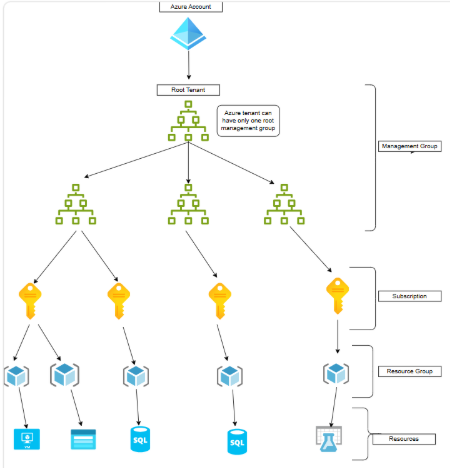
Let’s break down Azure’s hierarchy from the top down.
1. Azure Tenant (The Root)
At the very top is the Azure Tenant, also known as an Azure Active Directory (Entra ID) tenant. When your organization signs up with Microsoft, it gets a unique tenant. This tenant acts as a single identity and security boundary. It holds user accounts, groups, and application registrations. Think of it as the “head office” that oversees everything below.
2. Management Groups (The Organizers)
Below the tenant come Management Groups. These act like folders. At the very top of this structure sits the Root Management Group — and as the saying goes, “It’s Always One.” There is exactly one root management group per tenant, and it sits above all other management groups. You cannot delete or rename it. Everything in your Azure organization inherits settings from this single root. From this root, you can create child management groups (like “Production” or “Development”) to group multiple subscriptions together and apply policies at scale.
3. Subscriptions (The Billing & Governance Boundary)
Inside management groups (or directly under the tenant) are Subscriptions. A subscription is a logical container for billing and resource management. It separates usage and costs. You might have separate subscriptions for different departments (HR, Finance, IT) or different environments (Test, Stage, Prod). Subscriptions also have limits (like how many virtual machines you can run), so they help control scale.
4. Resource Groups (The Logical Pools)
Each subscription contains Resource Groups. A resource group is like a project folder. It holds related Azure resources that share the same lifecycle. For example, a web app’s resource group would contain the App Service, a database, and a storage account. If you delete the resource group, everything inside gets deleted too. Resource groups are also where you manage permissions at a granular level.
5. Resources (The Actual Services)
At the bottom are Resources—the actual services you use, such as virtual machines, SQL databases, or AI services. These are the “real” building blocks of your cloud applications. Each resource exists inside exactly one resource group, which exists inside one subscription, and so on
Why Does This Matter?
This hierarchy enables efficient governance. You can apply security rules at the management group level, track costs per subscription, and delegate access per resource group. It saves time, reduces errors, and keeps your cloud environment organized.
Final Takeaway
Always design your hierarchy before you deploy. Start with a clean tenant, group subscriptions logically, and use resource groups to manage related services together. Once you understand Azure Hierarchy, you’ll feel much more confident building in the cloud.
Author By

Gaurav Lakhotia
Gaurav holds an MBA in Business Analytics. As a data geek and avid learner, he has earned accolades including Microsoft Certified Data Analyst, Microsoft Certified Azure Administrator, and active Power BI Community contributor. He is also a Microsoft Certified Trainer. With critical thinking and project delivery skills, he strives to achieve customer delight in Data Analytics projects. Gaurav loves travelling with friends when he is not busy working on data.