
TL;DR
Microsoft Azure is the second-largest cloud platform and the best fit for businesses already using Microsoft 365, Dynamics 365, SQL Server and Power BI. Microsoft Fabric is now the default for new analytics projects, supported by Data Factory, Azure SQL and Databricks. Success on Azure means migrating workload by workload, building a governed, layered data platform, securing data early and using reservations to cut costs by up to 72%.
An Introduction to Microsoft Azure
Microsoft Azure is where most Microsoft-centric enterprises now run their data, analytics and AI. It is the second-largest cloud platform in the world, and it connects natively to the tools your teams already use: Microsoft 365, Dynamics 365, SQL Server and Power BI.
But Azure is also big. It has hundreds of services, several overlapping data tools and a pricing model that can surprise finance teams. Choosing between Azure Data Factory, Synapse, Databricks and Microsoft Fabric is now one of the most common questions data leaders ask us.
This guide is the starting point for Addend Analytics’ Azure content. It explains what Azure is, which services matter for data and analytics, how to migrate, how to keep it secure and affordable, and how Azure compares with AWS and Google Cloud. Each section links to a deeper guide.
Understanding Microsoft Azure and Its Ecosystem
Microsoft Azure is Microsoft’s public cloud platform. It lets businesses rent computing power, storage, databases, analytics, AI and networking on demand, instead of buying and running their own servers.
Azure delivers these services in three models:
- Infrastructure as a Service (IaaS): virtual machines, storage and networks you manage yourself. Best for lift-and-shift migrations.
- Platform as a Service (PaaS): managed databases, app hosting and data pipelines where Microsoft runs the infrastructure. Examples are Azure SQL Database and Azure Data Factory.
- Software as a Service (SaaS): finished applications. Microsoft Fabric and Power BI sit here, with Microsoft 365 and Dynamics 365 running on the same cloud.
The Azure Ecosystem
Azure’s strength is that it is one part of a connected Microsoft stack. Identity comes from Microsoft Entra ID, the same sign-in your staff use for Microsoft 365. Business data flows in from Dynamics 365 and Business Central. Analytics lands in Microsoft Fabric and Power BI. Copilot and Azure AI Foundry add AI on top.
For a company already invested in Microsoft, this means fewer integrations to build, one security model and one vendor relationship.
Global Footprint and Market Position
- Scale: Microsoft reports more than 80 datacenter regions across 34 countries, which helps with data residency rules such as GDPR.
- Market share: Synergy Research Group puts Azure at 19% of cloud infrastructure services in Q3 2026, second to AWS at 26% and ahead of Google Cloud at 16%.
- Growth: Azure grew 48% year on year in the September 2026 quarter, driven largely by AI workloads.
Essential Azure Services by Business Function
Most enterprises use a small core of Azure services. The table groups them by what they do for the business.
| Category | Key services | Business application |
| Compute | Virtual Machines, App Service, Azure Functions, Azure Kubernetes Service (AKS) | Host ERP add-ons, web apps and APIs; run event-driven jobs without managing servers |
| Storage | Blob Storage, Azure Data Lake Storage Gen2, Azure Files | Store raw files, backups and data lake zones at low cost |
| Databases | Azure SQL Database, Azure SQL Managed Instance, Cosmos DB, Azure Database for PostgreSQL | Run transactional apps, modernize on-premises SQL Server, power global low-latency apps |
| Data integration | Azure Data Factory, Logic Apps, Event Hubs, API Management | Move and transform data from ERP, CRM and IoT sources; automate workflows |
| Analytics | Microsoft Fabric, Azure Synapse Analytics, Azure Databricks, Power BI | Build data warehouses and lakehouses; deliver dashboards and self-service reporting |
| AI and machine learning | Azure AI Foundry, Azure OpenAI, Azure Machine Learning, Azure AI Search | Forecast demand, predict failures, build copilots and AI agents on company data |
| Security and identity | Microsoft Entra ID, Key Vault, Microsoft Defender for Cloud, Microsoft Sentinel | Single sign-on, secrets management, threat detection and compliance reporting |
| Governance and management | Microsoft Purview, Azure Policy, Azure Monitor, Cost Management | Catalog and classify data, enforce rules, monitor health and control spend |
| Hybrid and migration | Azure Migrate, Azure Arc, Azure Site Recovery | Assess and move workloads, manage on-premises servers from Azure, run disaster recovery |
Azure Data Services Compared: ADF, Synapse, SQL, Databricks and Fabric
For new analytics projects in 2026, Microsoft Fabric is the default starting point, with Azure SQL, Data Factory and Databricks filling specific roles around it. Here is what each service does and when to use it.
Azure Data Factory (ADF)
Azure Data Factory is Azure’s managed data integration service. It builds pipelines that copy and transform data between on-premises systems, SaaS apps and cloud stores, using ETL or ELT patterns. It supports more than 100 connectors and includes a self-hosted integration runtime for reaching data behind your firewall.
Use it for: scheduled loads from ERP, CRM and databases; orchestrating Databricks or SQL jobs; migrating SSIS packages to the cloud.
2026 note: Microsoft positions Data Factory in Fabric as the next generation of ADF. A migration assistant for ADF and Synapse pipelines is in public preview, so new projects increasingly start in Fabric. Read our comparison of the best ETL tools in 2026.
Azure Synapse Analytics
Azure Synapse Analytics (formerly Azure SQL Data Warehouse) combines dedicated and serverless SQL pools, Apache Spark and pipelines in one workspace. It has been the standard Azure data warehouse for SQL-first teams.
2026 note: Synapse has no announced end-of-life date and remains fully supported. However, Microsoft is putting new investment into Fabric and offers migration tools from Synapse to Fabric. Some related features, such as Azure Synapse Link for Cosmos DB, are being retired. Keep stable Synapse workloads running, but plan new warehouse work in Fabric.
Azure SQL
Azure SQL is the family of managed SQL Server engines in the cloud:
- Azure SQL Database: a fully managed single database or elastic pool, ideal for new cloud apps.
- Azure SQL Managed Instance: near-100% compatibility with on-premises SQL Server, ideal for lift-and-shift of existing databases.
- SQL Server on Azure VMs: full control of the operating system, for apps that need it.
Use it for: transactional systems, operational reporting databases and modernizing SQL Server 2016 and older before end of support. See our guide to SQL stored procedure best practices.
Azure Databricks
Azure Databricks is the Databricks lakehouse platform delivered as a first-party Azure service. It runs Apache Spark with Delta Lake and Unity Catalog, and supports Python, SQL, Scala and R in shared notebooks.
Use it for: large-scale data engineering, machine learning, streaming data and teams that need a multi-cloud option.
Microsoft Fabric
Microsoft Fabric is Microsoft’s all-in-one SaaS analytics platform. It brings data integration, data engineering, data warehousing, real-time intelligence, data science and Power BI into one product, all built on a single data lake called OneLake.
OneLake shortcuts let teams read data in Azure, AWS or other platforms without copying it. Fabric has passed 40,000 paid customers, and Microsoft calls it the fastest-growing data platform in its history.
Use it for: new data platforms, unifying Power BI and data engineering, and replacing fragmented Synapse plus ADF plus Power BI stacks. Read how to ingest data into a Fabric lakehouse with Dataflow Gen2 and our Fabric capacity sizing guide.
Which Azure Data Service a Business Should Choose?
| Service | Type | Best for | Main users | Pricing model | 2026 status |
| Azure Data Factory | PaaS integration | Hybrid ETL/ELT pipelines and orchestration | Data engineers | Per activity run and data movement | Supported; Fabric Data Factory is the successor for new work |
| Azure Synapse Analytics | PaaS warehouse | Existing SQL data warehouses | SQL developers, BI teams | Per DWU (dedicated) or per TB scanned (serverless) | Supported, no end-of-life date; new investment goes to Fabric |
| Azure SQL | PaaS database | Transactional apps, SQL Server modernization | App and database teams | vCore or DTU, serverless option | Actively developed |
| Azure Databricks | PaaS lakehouse | Big data engineering, ML, multi-cloud | Data engineers, data scientists | Databricks units plus compute | Actively developed |
| Microsoft Fabric | SaaS platform | End-to-end analytics with Power BI on one lake | Whole data team and business users | Capacity (F SKUs) | Microsoft’s strategic analytics platform |
Azure Migration Strategies: The 5 Rs Explained
A successful Azure migration is planned workload by workload, not as one big move. Microsoft’s Cloud Adoption Framework gives the structure, and Azure Migrate provides the tools to assess servers, databases and apps before anything moves.
Choose a Strategy for Each Workload (The 5 Rs)
| Strategy | What it means | Typical example |
| Rehost (lift and shift) | Move as-is to Azure VMs | Legacy app servers with a near-term datacenter exit |
| Refactor | Small changes to use managed services | SQL Server to Azure SQL Managed Instance |
| Rearchitect | Redesign for cloud-native services | SSIS packages rebuilt as Fabric or ADF pipelines |
| Rebuild | Rewrite from scratch | Old on-premises reporting replaced by a Fabric lakehouse and Power BI |
| Replace | Swap for SaaS | Custom finance tools replaced by Dynamics 365 Business Central |
A Phased Migration Approach
- Assess: inventory workloads, dependencies and costs with Azure Migrate. Build a total cost of ownership (TCO) comparison.
- Plan: pick a strategy per workload, set up the landing zone (subscriptions, networking, identity, policies) and define success metrics.
- Pilot: move one low-risk workload to prove the approach and the runbook.
- Migrate in waves: move workloads in groups, testing performance and data accuracy after each wave.
- Optimize: right-size resources, apply reservations and set up monitoring and cost alerts.
- Modernize: move from IaaS to PaaS and SaaS services over time to cut management effort.
Data and Analytics Migrations We See Most Often
- SQL Server 2016 and older to Azure SQL or Fabric. See SSIS migration to Azure
- Azure Synapse and ADF to Microsoft Fabric
- Qlik or Tableau to Power BI. See our Qlik to Power BI migration guide
- On-premises data warehouses to an Azure lakehouse
How Azure Stores, Integrates and Analyzes Data
Azure separates storage from compute, so you can keep all your data in one low-cost lake and pay for processing only when you use it.
Data storage
- Azure Data Lake Storage Gen2: the standard data lake for analytics, with hot, cool, cold and archive tiers to match cost to how often data is used.
- Blob Storage: object storage for files, images, logs and backups.
- OneLake: Fabric’s built-in lake. It stores data in the open Delta Parquet format and can point to ADLS, Amazon S3 and other stores through shortcuts.
- Operational databases: Azure SQL for relational data, Cosmos DB for globally distributed NoSQL, and Azure Database for PostgreSQL or MySQL for open-source apps.
Analytics
Most Azure analytics platforms now follow the medallion pattern:
- Bronze: raw data landed as-is from source systems.
- Silver: cleaned, de-duplicated and conformed data.
- Gold: business-ready tables and semantic models that feed Power BI and AI.
Fabric, Databricks and Synapse all support this pattern. Power BI then sits on the gold layer for dashboards, and Copilot or Fabric data agents let business users ask questions in plain language.
Integration
- Batch integration: Azure Data Factory or Fabric Data Factory pipelines for ERP, CRM and database loads.
- Real-time streaming: Event Hubs, IoT Hub and Fabric Real-Time Intelligence for machine sensors, clickstreams and transactions.
- Application integration: Logic Apps and API Management to connect SaaS apps and expose data through secure APIs.
- Zero-copy access: Fabric mirroring and OneLake shortcuts to bring in Azure SQL, Cosmos DB, Snowflake or Databricks data without building pipelines.
Good integration depends on good governance. Read what data governance initiatives actually fix.
How to Design a Scalable Azure Data Architecture
A modern Azure data platform has four layers, with security and governance applied across all of them.
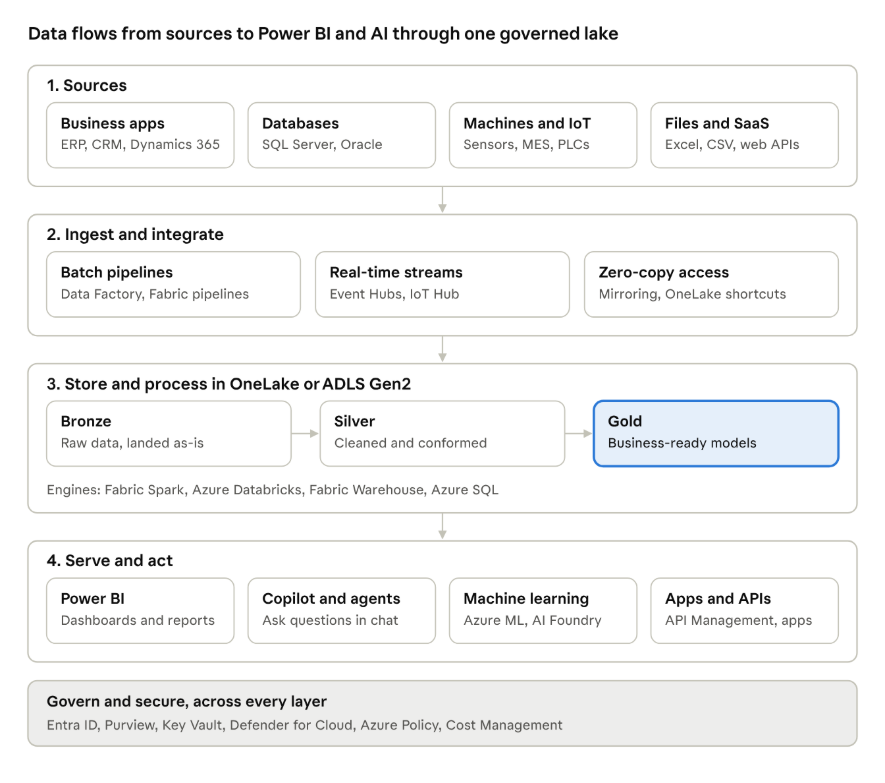
Modern Azure data platform: 4 layers plus governance
Data moves top to bottom: sources feed ingestion, ingestion lands data in the lake, the lake refines it from bronze to gold, and the gold layer serves Power BI, AI and apps.
Architecture Principles That Hold Up At Scale
- Use a landing zone. Set up subscriptions, networking, identity and policies before the first workload, following the Azure Well-Architected Framework.
- Keep one copy of the data. Store data once in OneLake or ADLS Gen2 in open Delta format, and let each engine read it in place.
- Separate environments. Run development, test and production in separate workspaces or subscriptions, with CI/CD through Azure DevOps or GitHub.
- Build a semantic layer. Define KPIs once in a governed Power BI semantic model so every report and AI agent uses the same numbers.
Azure Governance and Compliance: What Enterprises Need to Know
Azure security works on a shared responsibility model. Microsoft secures the physical datacenters, hardware and core platform. You secure your identities, data, access rules and configurations.
Core Security Layers
- Identity: Microsoft Entra ID provides single sign-on, multi-factor authentication and conditional access. Use managed identities so pipelines never store passwords.
- Network: virtual networks, private endpoints and Azure Firewall keep data services off the public internet.
- Data protection: encryption at rest and in transit by default, with customer-managed keys in Azure Key Vault where needed.
- Threat protection: Microsoft Defender for Cloud scores your security posture and flags risks. Microsoft Sentinel adds SIEM for security operations teams.
- Data security in analytics: row-level and column-level security in Azure SQL, Fabric and Power BI, plus OneLake security, which applies one permission model across Fabric workloads.
Governance
- Microsoft Purview catalogs, classifies and tracks the lineage of data across Azure, Fabric and on-premises sources.
- Azure Policy enforces rules, such as allowed regions or mandatory tags, across every subscription.
- Management groups and role-based access control (RBAC) keep permissions consistent across teams.
Compliance
Azure holds a broad set of certifications, including ISO 27001, SOC 1 and 2, HIPAA support, GDPR and FedRAMP. The EU Data Boundary and Microsoft Sovereign Cloud help regulated companies control where data is stored and processed.
For AI workloads, see our guide to AI governance and responsible AI.
Performance at Scale: How Azure Handles Growth
Azure lets you scale up for month-end reporting or a product launch, then scale back down so you stop paying for idle capacity.
- Vertical scaling: move a database or VM to a larger size in minutes, often without downtime.
- Horizontal scaling: VM scale sets, AKS and App Service add or remove instances automatically based on load.
- Serverless: Azure Functions, Azure SQL Database serverless and Synapse serverless SQL charge only when work runs.
- Elastic analytics: Databricks clusters autoscale and shut down when idle. Fabric capacities can be resized or paused, and smoothing spreads short spikes over time.
- High availability: availability zones place copies of your service in separate datacenters within a region. Paired regions and Azure Site Recovery cover disaster recovery.
- Global reach: Azure Front Door and Cosmos DB multi-region writes keep apps fast for users in different countries.
The practical rule: design for the average load, and let autoscaling handle the peaks.
Azure Cost Management: Ways to Cut Spend
The biggest Azure savings come from committing to steady workloads and switching off everything else. Microsoft publishes these headline discounts against pay-as-you-go prices:
| Lever | Maximum published saving | Best for |
| Azure Hybrid Benefit | Up to 85% (combined with reservations) | Reusing existing Windows Server and SQL Server licenses with Software Assurance |
| Reserved Instances (1 or 3 years) | Up to 72% | VMs and databases that run all year in one region |
| Azure Savings Plan for compute (1 or 3 years) | Up to 65% | Compute that changes size, region or service over time |
| Spot VMs | Large discounts on spare capacity | Batch jobs and tests that can be interrupted |
Actual savings depend on the service, size, region and term.
Practical Cost Habits
- Right-size first. Use Azure Advisor to find oversized VMs and databases before buying reservations.
- Shut down idle resources. Schedule dev and test environments to stop at night and on weekends.
- Tier your storage. Move old data from hot to cool, cold or archive tiers automatically.
- Use serverless and autoscale for spiky workloads, and auto-terminate idle Databricks clusters.
- Size Fabric capacity carefully. Start small, monitor with the Fabric Capacity Metrics app and pause capacity when it is not needed.
- Tag and budget. Tag every resource by team and project, and set budgets and alerts in Azure Cost Management.
- Review monthly. Treat cloud cost as an ongoing FinOps practice, not a one-time project.
For real numbers, see how much Microsoft Fabric costs for a manufacturing company.
Real-World Microsoft Azure Use Cases by Industry
Azure delivers the most value when it replaces manual reporting and disconnected systems with one trusted data platform. These are the use cases we see most often.
| Industry | Business problem | Azure solution | What changes |
| Manufacturing | Production, quality and maintenance data sit in separate MES, ERP and machine systems | IoT Hub and Event Hubs for sensors, Fabric lakehouse for history, Azure ML for failure prediction, Power BI for OEE | Real-time line visibility and predictive maintenance instead of reacting to breakdowns |
| Financial services | Month-end close and regulatory reports take days of spreadsheet work | ADF or Fabric pipelines from core systems, Azure SQL, Purview for lineage, Power BI | Faster close, audit-ready reports and a single version of the numbers |
| Retail and distribution | Inventory and demand data lag behind sales | Fabric Real-Time Intelligence, Databricks forecasting models, Power BI | Better stock levels and fewer stockouts |
| Healthcare and life sciences | Patient and research data must stay compliant | Azure Health Data Services, private networking, Purview, Fabric | Secure analytics that meet HIPAA and GDPR |
| Professional services | Project, time and billing data spread across tools | Logic Apps and ADF integration, Azure SQL, Power BI | Live utilization and margin tracking by project |
| Any industry | Teams want to ask questions of company data with AI | Azure AI Foundry, Azure OpenAI, AI Search on a governed Fabric data layer | Copilots and AI agents grounded in trusted business data |
Real-World Example: Fabric At Enterprise Scale
Microsoft cites The Coca-Cola Company as a Fortune 500 business using Fabric at scale across its organization. Microsoft also reports that nearly 90% of the Fortune 500 now ground AI agents in enterprise context through Foundry, Fabric and Work IQ.
Our Coca-Cola case study shows how Coca-Cola Beverages Africa, the largest Coca-Cola bottler in Africa, cut IT costs from 2.85% of net sales revenue to just under 1.4% after moving to the Microsoft cloud.
Azure vs AWS vs Google Cloud: A Side-by-Side Comparison
All three platforms are mature and capable. For organizations already running Microsoft 365, Dynamics 365, SQL Server or Power BI, Azure usually wins on integration and licensing value.
| Factor | Microsoft Azure | Amazon Web Services (AWS) | Google Cloud |
| Market share, Q3 2026 (Synergy) | 19% | 26% | 16% |
| Year-on-year growth, Q3 2026 | 48% | 39% | 103% (includes Workspace) |
| Strongest fit | Microsoft-centric enterprises, hybrid IT, regulated industries | Broadest service catalog, cloud-native startups and digital businesses | Data science, AI research and open-source analytics |
| Analytics platform | Microsoft Fabric, Synapse, Databricks | Redshift, EMR, Glue, Athena | BigQuery, Dataproc, Dataflow |
| BI tool | Power BI (native) | QuickSight | Looker |
| AI platform | Azure AI Foundry, Azure OpenAI | Amazon Bedrock, SageMaker | Vertex AI, Gemini |
| Hybrid cloud | Azure Arc, Azure Local | AWS Outposts | Google Distributed Cloud |
| Identity | Microsoft Entra ID, shared with Microsoft 365 | AWS IAM, IAM Identity Center | Cloud Identity |
| Licensing advantage | Azure Hybrid Benefit for existing Windows Server and SQL Server licenses | Bring-your-own-license with more limits | Bring-your-own-license with more limits |
When Azure is the right choice: your users already sign in with Microsoft accounts, your ERP is Dynamics 365 or Business Central, you report in Power BI, or you need strong hybrid and compliance options.
When to consider others: your engineering teams are deeply skilled in AWS, or your workloads depend on a service only one provider offers. Many enterprises run more than one cloud, and Fabric’s OneLake shortcuts can read data stored in Amazon S3 and Google Cloud Storage.
Addend Analytics Azure Services: From Migration to AI
Addend Analytics is a Microsoft-focused data and analytics consultancy. Our consultants work across Azure, Microsoft Fabric, Power BI and Dynamics 365 Business Central, helping mid-sized and enterprise companies move from manual reporting to automated, real-time analytics.
We help with:
- Azure readiness and migration: assessments, landing zones and SQL Server, SSIS and data warehouse migrations
- Modern data platforms: Fabric, Azure Databricks and Azure SQL lakehouses and warehouses
- Synapse and ADF to Fabric modernization: phased migrations that keep reporting running
- Power BI and AI: dashboards, semantic models, Copilot and AI agents on trusted data
- Cost and governance reviews: right-sizing, reservations, Purview and security hardening
More Azure Resources From Addend Analytics
Go deeper on any topic in this guide with these Addend Analytics articles, grouped by subject.
Azure Fundamentals
Data Integration and Azure Data Factory
Synapse and Databricks
Microsoft Fabric: Strategy and Implementation
Microsoft Fabric: Data Engineering and BI
Azure SQL and SQL Server
Cloud Migration
Security and Governance
Cost and ROI
AI on Azure
Industry Use Cases
DevOps and Multi-cloud
Working with Addend
Why Enterprises Choose Addend Analytics for Azure
Addend Analytics works only on the Microsoft data stack, so every recommendation we make fits the Azure, Fabric and Power BI tools you already own. Here is what sets us apart.
- Microsoft Solutions Partner for Data & AI: our consultants hold Microsoft certifications in Azure administration, Azure database administration and data analysis, and our leadership brings more than 20 years of Microsoft BI experience.
- Microsoft-only focus: we specialize in Azure, Microsoft Fabric, Power BI and Dynamics 365 Business Central. We have no competing platform to sell, only the right Microsoft architecture for your business.
- Accelerators that cut delivery time: pre-built frameworks for manufacturing analytics, law firm analytics, Business Central reporting and Power BI template apps mean you start from a proven base, not a blank page.
- Industry depth: we serve manufacturing, professional services, CPG, law firms, non-profits, retail and financial services, so we already know the KPIs and data sources your teams rely on.
- Measured client results: our projects have delivered a 60% reduction in reporting time for a packaging manufacturer and 40% faster decisions for a retail chain.
- Proven quality: Addend is ISO 9001:2015 certified and Great Place To Work certified, and rated 4.9/5 on Microsoft Marketplace and 5.0/5 on G2.
- Global delivery, local support: with offices in Alpharetta (USA), London (UK) and Navi Mumbai (India), we support teams across time zones.
Key Takeaways
- Azure is the natural fit for Microsoft-first businesses. It’s the second-largest cloud platform, with 19% of the market in Q3 2026 behind AWS at 26%. It connects directly to Microsoft 365, Dynamics 365, SQL Server and Power BI.
- Microsoft Fabric is the starting point for new analytics projects. Azure Data Factory and Synapse are still supported and have no end-of-life date. But Microsoft’s new investment is going into Fabric.
- Each Azure data service has a clear job. Data Factory moves data between systems, Azure SQL runs transactional apps, Databricks handles heavy data engineering and machine learning, and Fabric covers end-to-end analytics with Power BI on one data lake.
- Migrate one workload at a time, not all at once. Choose a strategy for each workload, then assess, plan, pilot, migrate in waves and optimize.
- Modern Azure data platforms follow a layered design. Data moves from sources through ingestion into the lake, where it’s refined from bronze to silver to gold. It’s then served to Power BI and AI, with governance across every layer.
- Security is a shared responsibility. Microsoft secures the platform. Your team secures identities, access and data using Entra ID, Purview, Key Vault and Defender for Cloud.
- Commitments and licensing bring the biggest cost savings. Azure Hybrid Benefit saves up to 85%, Reserved Instances up to 72% and Savings Plans up to 65%. Right-sizing resources and shutting down idle ones add more.
- Azure pays off most when it replaces manual reporting. One trusted data platform gives manufacturing, finance, retail and healthcare teams real-time insight and room for AI.
FAQs
Author By

Afroz Labbai
Afroz is a Data Engineer and Team Lead with 4+ years of experience in building scalable data platforms using Azure technologies such as Azure Data Factory, Azure SQL, Databricks, and Synapse. He specialises in ETL development, SQL optimisation, and data modelling, delivering reliable and cost-efficient solutions for enterprise analytics. He is passionate about continuous learning, mentoring teams, and driving data-driven decision-making.